
Choose the size your reader will print on. In the United States and Canada that is Letter. Microsoft calls A4 a common size worldwide, and it is the one to expect in the UK and Europe. If nobody will print the file, either works, and you can stop here.
The rest of this post is for when the choice matters: you are sending a document across the Atlantic, you are setting a default in a tool, or a page that fitted on one sheet now spills onto a second.
The two sizes in numbers
| Letter | A4 | |
|---|---|---|
| Inches | 8.5 × 11 | 8.27 × 11.69 |
| Millimeters | 215.9 × 279.4 | 210 × 297 |
| Points (what Word stores) | 612 × 792 | 595.3 × 841.9 |
| Area | 603.2 cm² | 623.7 cm² |
Microsoft’s page on paper sizes (last updated April 8, 2025, read November 29, 2026) gives the standard values: A4 is 297 × 210 mm under the ISO 216 standard and is common worldwide, and Letter is 8½ × 11 inches and is common in the United States, Canada and other countries of North and Central America. The inch figures for A4, the area, and the points are our own arithmetic and our own reading in Word, shown below.
From those numbers:
- A4 is 5.9 mm narrower than Letter (215.9 minus 210).
- A4 is 17.6 mm taller (297 minus 279.4).
- A4 has 3.4% more area: 62,370 mm² against 60,322 mm².
So Letter is the squarer, wider sheet, and A4 is the longer, narrower one.
What it does to a page of text
Take one-inch margins on all four sides, the setting in the files our converter writes. The text area is then:
| Letter | A4 | |
|---|---|---|
| Width | 165.1 mm | 159.2 mm |
| Height | 228.6 mm | 246.2 mm |
Lines on A4 are 5.9 mm shorter (3.6% narrower), so some line breaks fall in different places. Pages on A4 are 17.6 mm taller, which is about 7.7% more height for text (697.9 points against 648). The taller page gives A4 more room for lines, and the narrower line takes a little of it back, so a long text of plain paragraphs can run to fewer A4 pages, but how many fewer depends on the text.
We checked it in Word. On November 29, 2026 we made one made-up text of 36 paragraphs (1,694 words with its heading, one heading and plain paragraphs, in Calibri 11 with one-inch margins) and wrote it twice with our converter: once as Letter and once as A4. Word 16.0 (build 16.0.20625) reported 13.8 points of line spacing and 8 points of space after each paragraph, and:
| Letter | A4 | |
|---|---|---|
| Page size reported by Word | 612 × 792 pt | 595.3 × 841.9 pt |
| Pages | 4 | 3 |
| Lines | 109 | 109 |
| Lines on the last page | 3 | 33 |
Same text, same 109 lines, one page fewer. Look at the last row, though. Letter spilled only 3 lines onto its fourth page, so a slightly shorter text would have taken 3 pages on both sizes. That is one text in one font, so treat the “one page fewer” as an example and not a rule. Tables, pictures and headings change the result, and a text that ends near a page boundary can land either way.
Who uses which
Microsoft’s page says A4, from the ISO 216 standard, is a common size worldwide for business and personal use, and that in the United States, Canada and other countries and regions of North and Central America, Letter is a common size. It also says it is possible to print a document designed for one paper size on paper of another, but that a better experience comes from a page layout suited to the target market, and that the default layout should use the page size appropriate for that market.
How to choose
- Where will it be printed or filed? Use the size of that country. Letter for the United States, Canada and the other North and Central American countries Microsoft names, A4 for most other places. If you are unsure, ask the recipient.
- Is it a form with a fixed layout? Match the form. If a template is already A4 or Letter, keep it.
- Will people print it on their own printers, in different countries? Think about the reader who has to print, and give them their own size, or tell them which size you used.
- Is it only read on a screen? Either works. Pick the one your own tools default to.
- Does it have to be a fixed number of pages? Check the page count after switching size, because the text moves, as the example above shows.
Setting the size in our converter
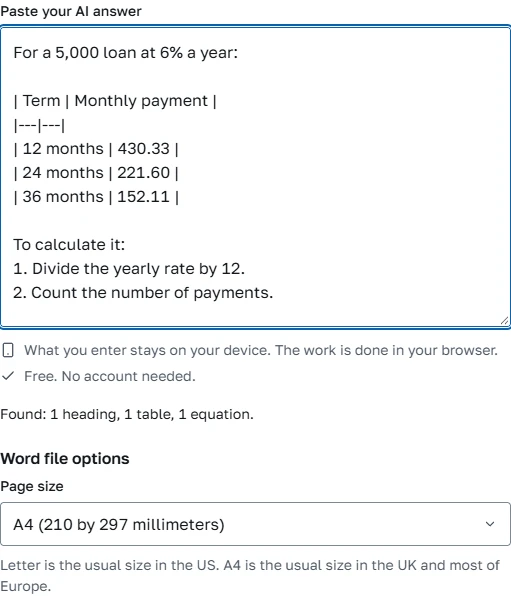
The Markdown to Word converter has a Page size choice with Letter and A4. Letter is the default, and A4 is one choice away for UK and European readers. The size is written into the Word file, so the recipient sees the page size you chose.
If your text comes from ChatGPT and arrives with stray symbols first, start with fixing the paste into Word.
Sources
- Paper sizes, Microsoft Learn: the ISO 216 and A4 values, the Letter values and the regions. Read November 29, 2026; page last updated April 8, 2025.
- Our own arithmetic from those values (1 inch is 25.4 mm), November 29, 2026.
- Our own test, November 29, 2026, Word 16.0 build 16.0.20625: page size in points, the page counts, the line counts and the lines on the last page of one made-up text. The log is in our test notes.