Two different things go wrong when a ChatGPT answer lands in Word, and they need different fixes.
Look at the text you pasted:
- You can read it normally, but the bold and italic words look plain. The emphasis was lost on the way into Word.
- You can see
**,##or rows like|---|---|. You pasted Markdown, the plain-text way chat tools write formatting, and Word showed it as typed.
If it is the second one, skip to the section on stray symbols. If it is the first, read on.
What people report
An OpenAI community thread titled “Redux: ChatGPT’s Copy-Paste Is BROKEN Again” has 15 posts as of November 29, 2026. These are what its users say, not something we could confirm:
- October 9, 2026: the first poster says that since about October 8, copying newly generated ChatGPT answers into Word or Google Docs stopped keeping bold and italic, while headings, bulleted lists and numbered lists still arrived. They say older answers still copy correctly, and that the built-in Copy button and selecting text by hand behave the same.
- November 6, 2026: another user says “Copy entire response” now puts raw
###and**symbols in Word, adds large paragraph spacing, and brings tables in as plain text. They name their Word version (Microsoft 365, version 2608). - November 20, 2026: a reply from OpenAI Support lists things to try. Select only the response text and stop before the controls under it. Use Paste Special in Word and pick Unformatted Text or Keep Text Only. Paste into a plain-text editor first. Or ask ChatGPT for plain text without Markdown or tables. The reply adds that the plain-text options remove bold, italics, links and tables.
The thread does not name a cause or a fix, and we have not tested ChatGPT’s copy button ourselves. What we can test is what Word does with what arrives, and that is the useful part.
Lost bold and italics: what Word can and cannot bring back
Word lets you choose how to paste. Microsoft’s page on pasting (checked November 29, 2026) describes three:
| Option | What it does, per Microsoft |
|---|---|
| Keep Source Formatting (K) | Keeps the formatting of the copied text. This is Word’s default when you paste with Ctrl+V. |
| Merge Formatting (M) | Drops most direct formatting but keeps emphasis such as bold and italic applied to part of the text. The text takes on the style of the paragraph where you paste. |
| Keep Text Only (T) | Drops all formatting and non-text items. Tables become a series of paragraphs. |
After pasting, press Ctrl or click the Paste Options button that appears, and try the three in turn. It takes a few seconds. You can also set a default under File, Options, Advanced, “Cut, copy, and paste”, in the line “Pasting from other programs”.
Be realistic about it. A paste option can only keep what the clipboard holds. The first poster in the thread says Google Docs loses the bold too, which points at what ChatGPT puts on the clipboard, not at Word. We cannot run ChatGPT’s copy button, so we could not test whether any paste option brings the bold back, and we have no tested fix for bold that never reached the clipboard. If all three options leave the words plain, copy the answer again later, or retype the few words that matter.
Stray symbols: convert the Markdown
If you can see **, ## or |---|, the text on your clipboard is Markdown. We checked what Word does with it on November 29, 2026, in Word 16.0 (build 16.0.20625) on Windows. We took the example below, the same text as the worked example on our converter page, saved it as a .md file, and opened that file in Word. Word opened it as plain text, in the “Plain Text” style: 16 paragraphs, no table and no equation. Pasting the same text gave Normal paragraphs with every symbol still on the page.
## Monthly payment

The monthly payment on a loan is \( M = P \cdot \frac{r}{1 - (1 + r)^{-n}} \), where **P** is the amount borrowed, *r* is the monthly rate and *n* is the number of payments.

For a 5,000 loan at 6% a year:

| Term | Monthly payment |
|---|---|
| 12 months | 430.33 |
| 24 months | 221.60 |
| 36 months | 152.11 |

To calculate it:
1. Divide the yearly rate by 12.
2. Count the number of payments.
So Word will not do this conversion for you. You need something that reads the symbols and builds a heading, bold text, a table and an equation. Our Markdown to Word converter does that in your browser. You paste the answer, look at the preview, and download a .docx file. For this example it gives a Heading 2, a Word table with a header row and three rows of data, a numbered list, and the formula as a real Word equation. We opened the file in Word and counted each of them.
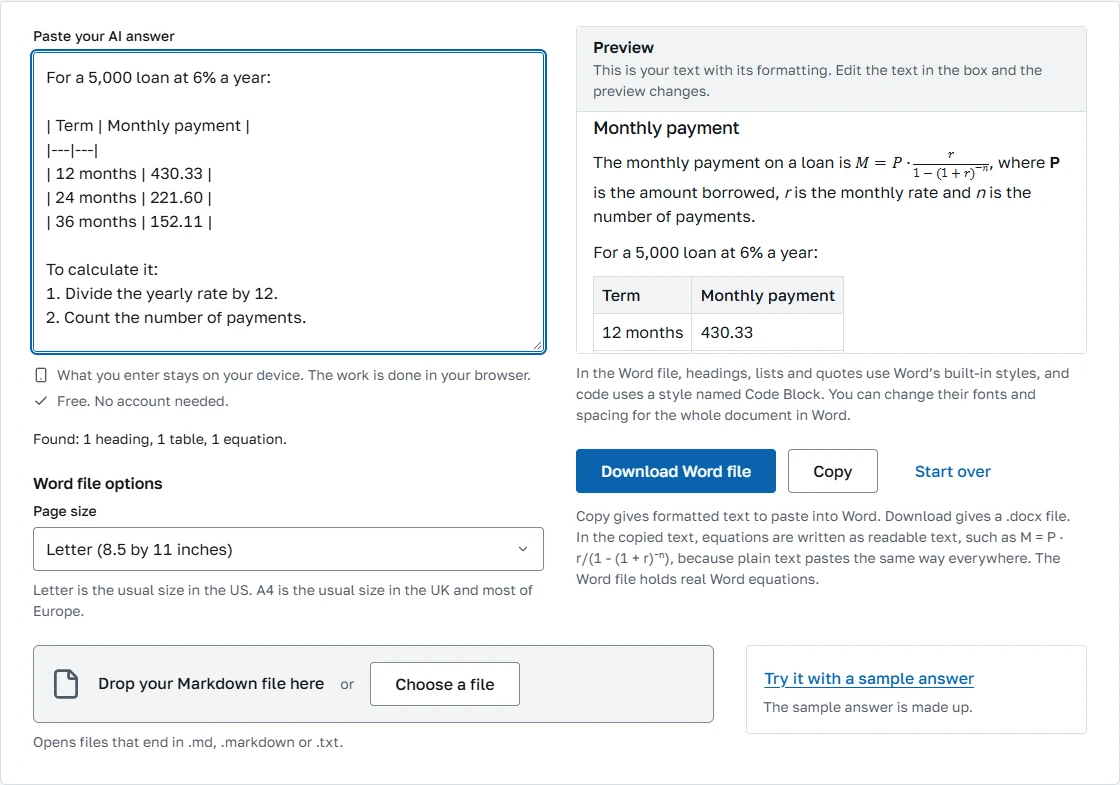
It has limits you should know about. It does not add pictures; it keeps their description text. It stops at 1 million characters. It cannot recover bold that was already lost when you copied, because the symbols are not in the text any more. If you use Google Docs, Docs has its own Markdown paste.
A short text: find and replace
For a few lines, Word’s own Find and Replace can turn **bold** into bold. We ran this in Word 16.0 through its automation interface, which uses the same find and replace settings as the dialog:
- Open Find and Replace (Ctrl+H) and tick “Use wildcards”.
- Find what:
\*\*(*)\*\* - Replace with:
\1, and set the replacement format to Bold. - Replace All.
- For italics, do the same with
\*(*)\*and the format Italic. Do the bold pass first.
On the one-line test text “This is bold text and this is italic text, and two bold words in one line”, the bold pass made “bold”, “two bold” and “one” bold (four words in all), and the italic pass made “italic” italic. The symbols were gone. We tested only that one line. Text with other asterisks, such as bullets written as * item, was not tested, so check the result. It does nothing for headings, tables or equations, so it is only worth it for a paragraph or two.
Asking for plain text
OpenAI Support’s other suggestion is to ask ChatGPT for the answer as plain text. We did not try it. By the reply’s own description it removes bold, italics, links and tables, so it gives you clean words and gives up the formatting you wanted. Use it for a note, not for a report with a table.
Which fix for which problem
| What you see in Word | Try this first |
|---|---|
| Plain words, bold and italic missing | Paste Options, all three. If the bold is still missing, it was not on the clipboard and we have no tested fix |
**, ##, |---| on the page | Convert the Markdown, or Find and Replace for a few lines |
| A table as plain text lines | Convert the Markdown. Keep Text Only turns tables into paragraphs |
| Equations as backslashes and braces | See our checklist for ChatGPT equations in Word |
If you are choosing between a Markdown tool and Pandoc, this comparison lays out when each one fits.
Sources
All checked on November 29, 2026.
- Redux: ChatGPT’s Copy-Paste Is BROKEN Again, OpenAI Developer Community: user reports of October 9, November 6 and the OpenAI Support reply of November 20, 2026.
- Control the formatting when you paste text, Microsoft Support: the three paste options and where to set the default.
- Our own tests, November 29, 2026, Word 16.0 build 16.0.20625: opening and pasting the example Markdown, and the find and replace passes.