A formula from ChatGPT pasted into Word often arrives as a line of backslashes and braces: \( M = P \cdot \frac{r}{1 - (1 + r)^{-n}} \). Word can show that as a proper equation, but only if the LaTeX goes in the right way. These six checks cover the ways it goes wrong.
1. See which kind of LaTeX you have
AI answers write equations in four forms:
\( ... \)for an equation inside a sentence\[ ... \]for an equation on its own line$ ... $for an equation inside a sentence$$ ... $$for an equation on its own line
Not every program reads all four. Pandoc’s manual, for example, describes the dollar forms as one extension (tex_math_dollars) and the \( \) and \[ \] forms as another (tex_math_single_backslash), which is marked as optional and has to be switched on by name. If a tool shows some equations and not others in the same answer, the delimiters are the first thing to compare.
2. Expect backslashes from a plain paste
On November 29, 2026 we put the loan example below into a text file and opened it in Word 16.0 (build 16.0.20625). Word showed it as plain text with every backslash in place: no equation, no table. Pasting the same text gave the same result. Word does not read Markdown or LaTeX from pasted text on its own.
3. Typing LaTeX into Word’s equation box
Microsoft says Word can read LaTeX typed into an equation if you have a Microsoft 365 subscription. We did not try the typing ourselves, because the Word on our test PC is the Office 2024 one-time purchase, not a subscription. What follows is from Microsoft’s page on linear format equations (checked November 29, 2026):
- Press Alt and = to start an equation, then type it.
- Word has two typing formats, UnicodeMath and LaTeX. You choose one on the Equations tab.
- To turn the typed line into the built-up equation, choose Convert, then Professional, or press Ctrl and =. To go back to the typed line, press Ctrl, Shift and =.
- The page gives
\frac{a}{b+c}as its LaTeX fraction example. - It calls the LaTeX typing new for Microsoft 365 subscribers, and it says the other Office applications support only UnicodeMath.
This route suits one or two equations. For an answer with a dozen, typing each one is slow, and it is easy to mistype a brace.
4. Know what Word’s LaTeX box does not accept
The same Microsoft page says most common LaTeX is supported and lists the exceptions. One it explains in words: the \begin{} and \end{} keywords are not supported. A matrix that ChatGPT writes as \begin{matrix} a & b \\ c & d \end{matrix} has to be typed as \matrix{a & b \\ c & d}. If an equation will not build, look first for a \begin{...} environment such as matrix, because that is the case Microsoft spells out.
5. Keep prices from turning into equations
Dollar signs are the other trap. A sentence such as “It costs $5 and $10 a month” has two dollar signs and could be read as an equation holding the text between them. Pandoc’s manual states the rule it uses: the opening dollar sign must have a non-space character right after it, the closing one must have a non-space character right before it and must not be followed by a digit, so “$20,000 and $30,000” does not parse as math. Our converter follows the same rule. On November 29, 2026 we ran a text with prices such as $5 and $10 next to real equations such as $p \cdot q$. In the Word file the prices stayed text, and the three real equations were equations.
6. Check every sign after the equation appears
A built equation can still be wrong. When we put equations on the clipboard as MathML, a math format for web pages, the way a browser does, and pasted them into Word 16.0, Word turned them into equations. In the examples we tried, it left out the center dot in P \cdot and the approximately-equal sign in \approx, and it kept the rest. Nothing warned us. We now read each operator after a paste, and our own Copy button writes equations as plain readable text, such as M = P · r/(1 - (1 + r)⁻ⁿ), instead of relying on that route.
A worked example
Take the loan formula from the top, with a 5,000 loan at 6% a year over 24 months. The monthly rate is r = 0.06 / 12 = 0.005, and n = 24.
- (1 + r)^-n = 1.005^-24 = 0.887186 (to six places)
- 1 minus 0.887186 = 0.112814
- P × r = 5,000 × 0.005 = 25
- M = 25 / 0.112814 = 221.60
The same formula gives 430.33 for 12 months and 152.11 for 36 months. We calculated all three with a script and they match to the cent. If your equation in Word does not give 221.60 when you enter the numbers, a sign was lost somewhere.
Converting the whole answer
When there are many equations, convert the entire answer instead. Our Markdown to Word converter reads all four forms and writes each as a Word equation inside the .docx file. We checked this in Word 16.0 on three test answers that use the four forms between them. Word counted every equation, inline and on its own line, as an equation object with a fraction inside. In the loan example we then changed the top of the fraction from r to q through Word’s automation interface, and Word rebuilt the equation around the new letter. That shows the equation is a real, editable one. We did not click through it by hand. If the converter cannot read an equation, the page says so and leaves that equation as typed, so you can fix it by hand with the Alt and = route above.
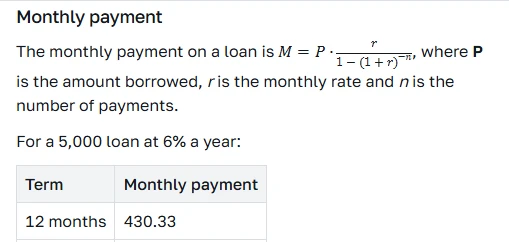
It does not add pictures. For the loan example it gave one equation inside the sentence. In a longer sample with a second formula on its own line, it gave two.
The checklist in one place
- Which form is it:
\( \),\[ \],$ $or$$ $$? - Did the tool read all of them, or only some?
- Any
\begin{}environments? Word’s LaTeX box needs\matrix{}. - Any prices with dollar signs that became equations by mistake?
- Is every operator still there: dots, plus-minus, approximately-equal?
- Does the formula give the right number for a case you can calculate by hand?
If your problem is bold text and headings and not equations, see what to do when ChatGPT text loses its formatting in Word. For other ways to convert, see Pandoc or a browser converter.
Sources
All checked on November 29, 2026.
- Linear format equations using UnicodeMath and LaTeX in Word, Microsoft Support: Alt and =, the two formats, Convert to Professional, the LaTeX example, the
\begin{}note and the Microsoft 365 remark. - Pandoc User’s Guide, math extensions: the dollar sign rule and the separate extensions for
\( \)and\[ \]. - Our own tests, November 29, 2026, Word 16.0 build 16.0.20625 (Office 2024): opening the example as text, the MathML paste, the prices sentence, counting and editing the equations in converted files. The log is in our test notes.